How Small Businesses Can Approach AI Adoption
Posted in :

How Small Businesses Can Approach AI Adoption
Most small business owners don't need an AI strategy document. They need answers to practical questions: which tasks are worth handing to AI, which tools to trust, what rules to set, and how to tell whether it's actually working. This step-by-step guide covers how to adopt AI safely and sensibly — starting small, measuring results and keeping people in charge.
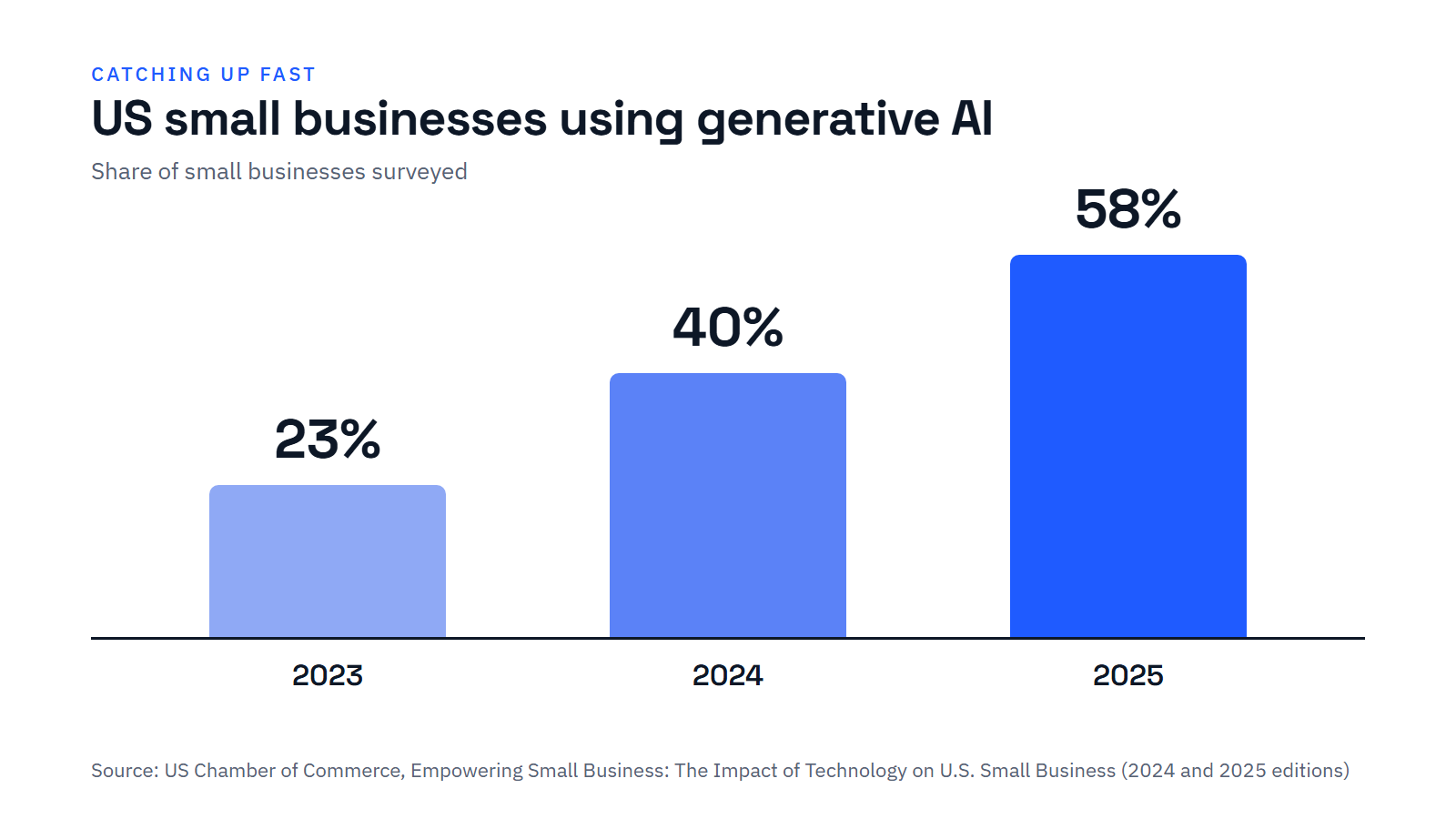
- Generative AI use among US small businesses rose from 23% in 2023 to 58% in 2025. The question is no longer whether to use it, but how.
- Start with a specific, repetitive problem, not with a tool.
- Check the AI features already built into the software you pay for before buying anything new.
- Write a one-page AI policy: what data never goes into AI tools, and what must always be checked by a person.
- Run a short trial, measure time saved and errors, then decide whether to scale up.
Why now
Small businesses have embraced AI faster than almost any earlier technology. According to the US Chamber of Commerce's annual small-business survey, the share of firms using generative AI tools rose from 23% in 2023 to 40% in 2024 and 58% in 2025 [1]. In Europe, small firms still lag well behind large ones — 11.2% of EU small businesses used AI in 2024, against 41.1% of large companies [2] — but the tools are becoming cheaper and easier every year.
For the bigger picture on what these changes mean for small firms, see our analysis What the Fourth Industrial Revolution Means for Small Businesses. This guide focuses on the practical steps.
Step 1: Start with a problem, not a tool
The most common mistake is buying an impressive tool and then looking for something to do with it. Instead, list the tasks that eat up your team's time or cause the most errors. Good first candidates are tasks that are frequent, repetitive, text-heavy and easy to check:
- Answering the same customer questions by email or chat
- Writing product descriptions, social posts or newsletters
- Summarising meetings, calls or long documents
- Drafting quotes, proposals and routine letters
- Categorising invoices, receipts and expenses
- Turning notes or voice memos into tidy reports
Step 2: Sort ideas by value and risk
Not every use of AI carries the same stakes. A quick way to prioritise is to ask two questions for each idea: How much time or money would this save? and What happens if the AI gets it wrong?
Start here
Internal drafts, meeting summaries, first versions of marketing copy. Big time savings, and mistakes are easy to catch before anything goes out.
Plan carefully
Customer-facing chatbots, quotes and pricing, anything financial. Worth doing, but only with clear rules and human review.
Nice to have
Occasional tasks that save a few minutes. Fine to try, but don't let them distract from bigger wins.
Avoid for now
Legal advice, hiring decisions, medical or safety guidance. The potential harm outweighs the small time saving.
Step 3: Choose tools carefully
Before signing up for anything new, check what you already have. Many accounting, e-commerce, email and office packages now include AI features that may already be part of your subscription. Using them avoids new costs and keeps your data in systems you already trust.
When you do evaluate a new tool, ask:- Does it use my data to train its models? Business plans often let you switch this off.
- Where is my data stored, and who can access it?
- Can I export my data if I switch providers later?
- What does it really cost per user, per month — including add-ons?
- Does it connect to the software I already use?
Step 4: Set simple rules
You don't need a lengthy governance framework, but you do need a few clear rules that everyone understands. A one-page AI policy might cover:
- Approved tools. Which AI tools staff may use for work.
- Off-limits data. Never paste in customer personal details, passwords, bank details or confidential contracts unless the tool is approved for it.
- Human check. Anything sent to customers, or involving money or legal matters, must be reviewed by a person.
- Honesty. Don't present AI-generated content as something it isn't, and tell customers when they're talking to a chatbot.
- Who to ask. Name one person responsible for questions and problems.
If you handle personal data, data protection laws still apply when you use AI. Regulators such as the UK's Information Commissioner's Office publish practical guidance for small organisations [3]. For a fuller framework, the US National Institute of Standards and Technology's free AI Risk Management Framework sets out how to identify and manage AI risks [4].
Step 5: Run a short trial and measure it
Pick one task, one tool and a small group of people, and test it for two to four weeks. Write down how things work today first, so you have something to compare against. Useful measures include:
Time saved
Minutes per task or hours per week, before and after.
Quality and errors
How often AI output needs heavy editing, and whether mistakes slip through.
Customer response
Reply times, complaints, reviews and satisfaction scores.
Team feedback
Do staff find it genuinely useful, or is it creating extra work?
Step 6: Train your team — and keep checking
Training matters more than the tool. Research on customer-support staff found that an AI assistant helped the least experienced workers most, raising their productivity by 34% [5]. But a Harvard Business School and BCG study also found that people using AI on tasks beyond its abilities did worse than those working without it [6]. Teach staff both how to use AI and when not to trust it.
The goal isn't to use as much AI as possible. It's to use it where it clearly helps — and nowhere else.
Common mistakes to avoid
- Too many tools at once. Subscriptions pile up, and nobody learns any of them properly.
- No human review. AI can produce confident but wrong answers, including made-up facts.
- Ignoring data privacy. Pasting customer information into an unapproved tool can break data protection law.
- Skipping the baseline. Without "before" numbers, you can't tell whether AI is really helping.
- Leaving staff out. The people doing the work know best where AI will help — and where it won't.
- List your five most time-consuming repetitive tasks.
- Pick one that's high value and low risk.
- Check whether your existing software already has an AI feature for it.
- Write your one-page AI policy.
- Measure how the task works today.
- Trial the tool for two to four weeks with a small group.
- Compare results, gather feedback, then decide whether to expand.
Sources
Every figure in this article comes from the sources below.
- US Chamber of Commerce Technology Engagement Center. Empowering Small Business: The Impact of Technology on U.S. Small Business (2024 and 2025 editions).
- Eurostat (2025). "Use of artificial intelligence in enterprises." Statistics Explained (2024 data).
- UK Information Commissioner's Office. Guidance on AI and data protection.
- National Institute of Standards and Technology (2023). Artificial Intelligence Risk Management Framework (AI RMF 1.0). NIST AI 100-1.
- Brynjolfsson, E., Li, D. & Raymond, L. R. (2023). "Generative AI at Work." NBER Working Paper 31161.
- Dell'Acqua, F. et al. (2023). "Navigating the Jagged Technological Frontier." Harvard Business School Working Paper 24-013.